For contractors
Keep subcontractor insurance records organized without a renewal spreadsheet
Every subcontractor you bring in carries general liability and workers' compensation that renew on their own dates. CompliDrop holds each sub's certificate, reads the limits and dates, checks them against the requirements you set, and sends reminders to you and the sub ahead of the expiration date.
You can start on the Free plan with up to 5 documents at a time, to try uploading and reviewing the records you already have. No credit card.
Vendor upload links need a paid plan. Pro is $49 a month, flat, with no per-vendor fee.
A short demonstration
A certificate is uploaded, read, corrected by a person and checked against a starter checklist. Then a vendor sends a document through an upload link, and the recording ends on where renewal dates and reminders are shown. Paid plansUpload links are part of the paid plans, not the Free plan.
The example vendor is a cleaning company on the “Property vendor” starter checklist. For a subcontractor you would pick “Subcontractor (construction)”, which checks the same three things: general liability of at least $1,000,000, an expiration date that has not passed, and workers' compensation.
No sound: the captions tell the story. The business, vendors and documents shown are made up.
Read what the demonstration shows
- Larkspur Group, a made-up business, keeps its vendors' insurance certificates in CompliDrop.
- Upload a certificate you already have, as a PDF or a phone photo.
- CompliDrop reads it. That usually takes under a minute; the wait is cut here.
- Here is what it read: the insured, the insurer, the policy dates and the coverage limits.
- A person compares them with the file. On this certificate the workers' comp policy ends first…
- …so they change the expiration date and save. The document is checked again at once.
- The result against the vendor's starter checklist, “Property vendor”: every requirement met.
- Upload links are part of the paid plans, not the Free plan.
- On a paid plan, send a vendor their private upload link. They need no account or password.
- The vendor opens the link: what you require, your note, and one place to upload.
- It is read and checked against the same checklist, and the vendor sees a one-line result.
- It arrives on your vendor's page, checked. This read is marked for a person to review.
- Renewal dates: the dashboard shows what has expired and what expires in the coming months.
- Reminders go out 60, 30, 14 and 7 days before a document expires.
- From 30 days out, the vendor gets them too.
- The business, vendors and documents in this recording are made up.
The job: a current certificate for every sub
The renewal spreadsheet is the usual tool: one row per sub, a column for the expiration date, and someone who has to remember to open it. The certificate itself sits in an inbox or a folder, and nobody reads the limits again after the first time.
CompliDrop reads each certificate, compares it with what you require and tells you which ones need attention. You still set the requirements, and you still look at anything it was not sure about.
How it works: an electrician, from certificate to reminder
This is the whole workflow for one subcontractor. Everything in it is on the Free plan unless it is marked as paid.
1Add the electrician and say what they must prove
Add the sub with a name and a contact email, then pick a checklist. The ready-made “Subcontractor (construction)” checklist asks for a certificate of insurance that shows at least $1,000,000 in general liability, has not expired, and carries workers' compensation.
To change the minimum or add requirements, make your own copy: an auto liability minimum, your business as additional insured, a license number on file. Each sub has one checklist. The ready-made checklists are starting points: they do not state what the law, your contracts or your insurer require.
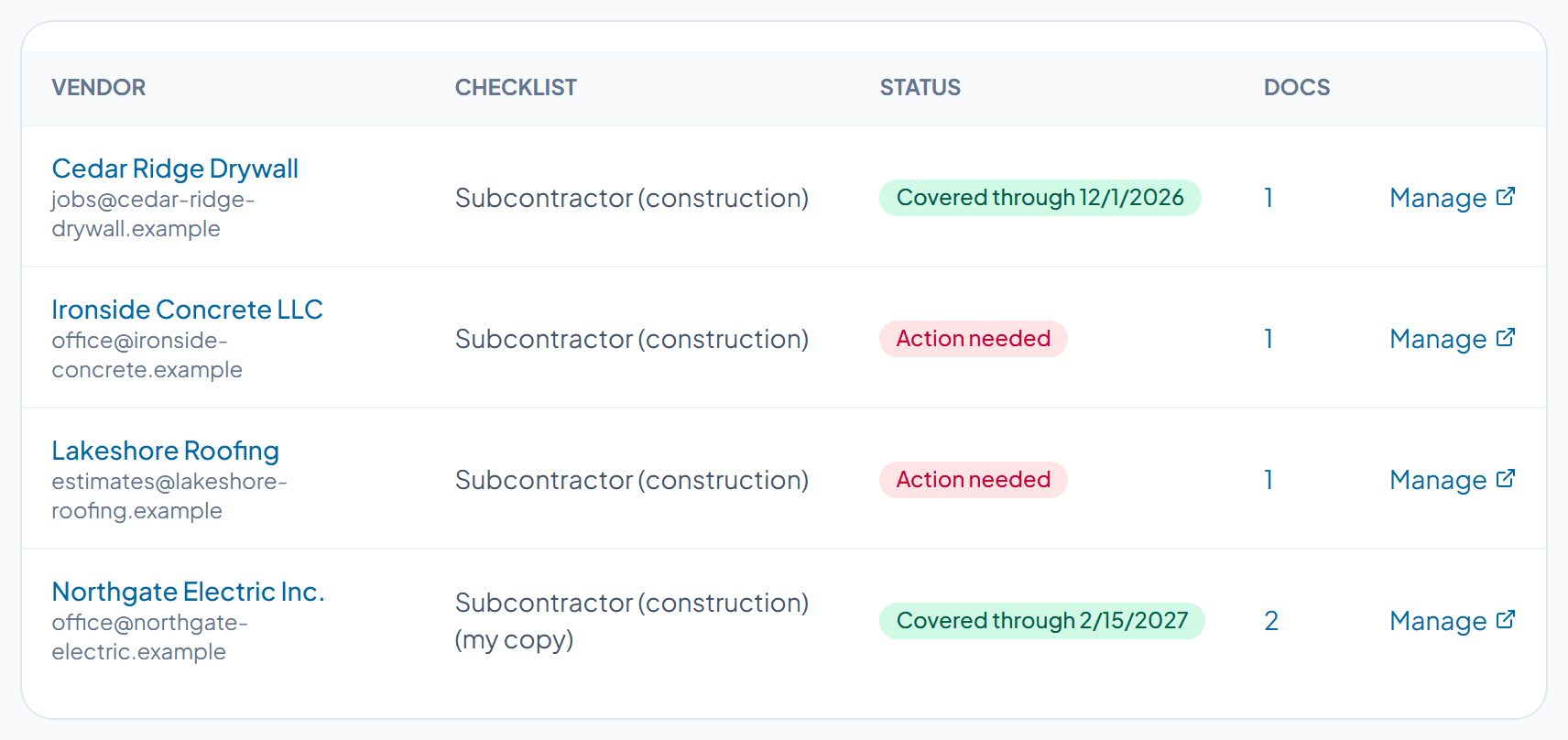
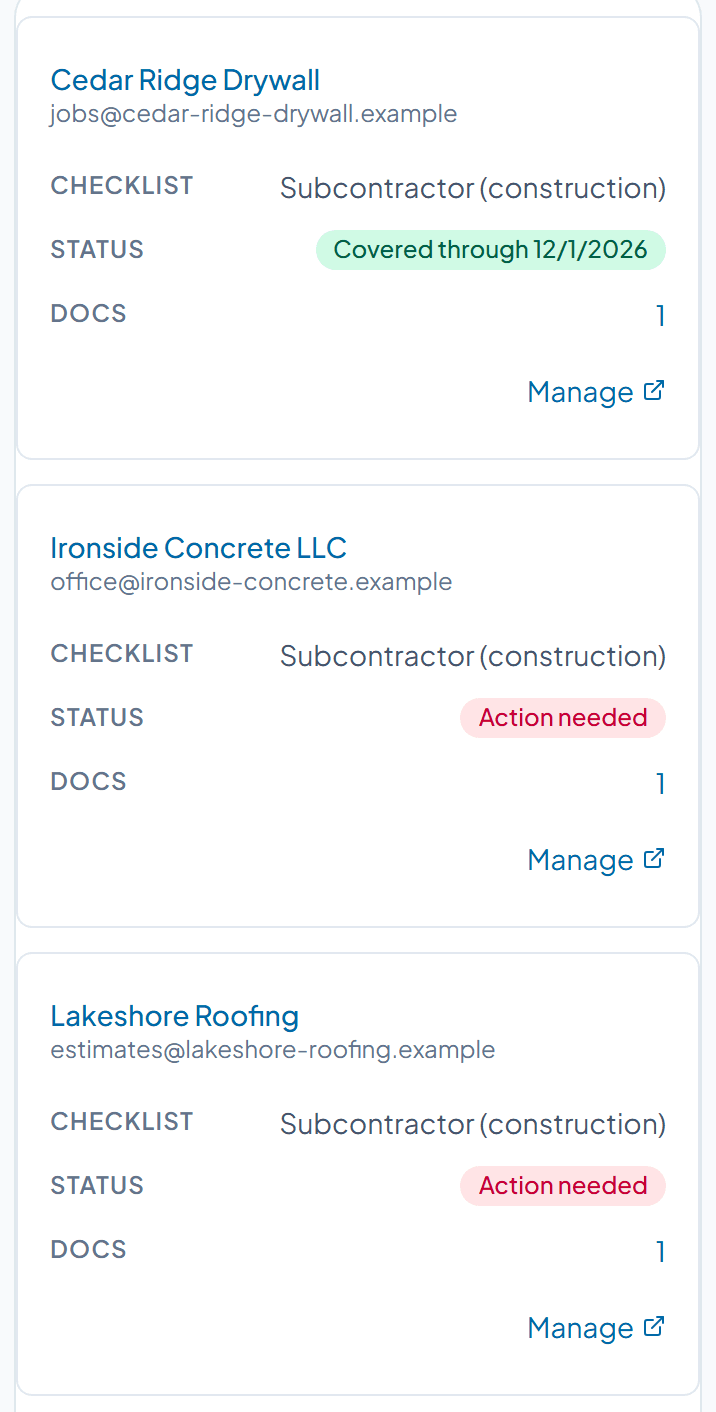
The vendor list: each subcontractor, the checklist they are held to, and where they stand. The vendors and documents shown are made up. 2Review the certificate
Upload the certificate as a PDF or a phone photo (JPEG, PNG or iPhone HEIC), up to 10 MB. CompliDrop reads the names, dates, policy numbers and coverage limits from the document; it usually takes under a minute.
Each document then shows Compliant, Action needed, Expiring soon (within 30 days) or Expired, and names the requirement that was not met. When CompliDrop isn't sure about a value, it outlines it and asks you to check it against the file. You can correct any value, and the document is checked again at once.
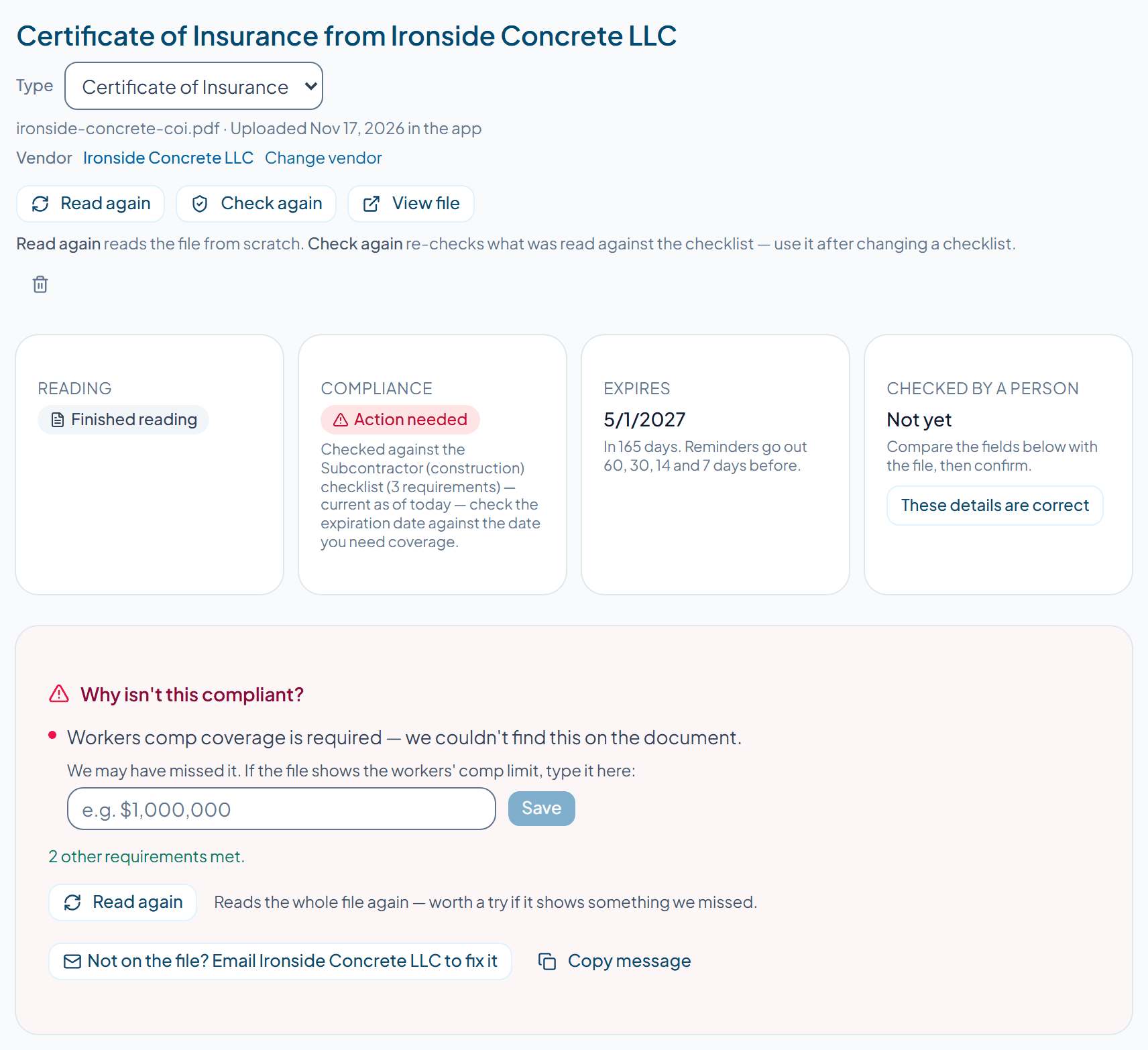
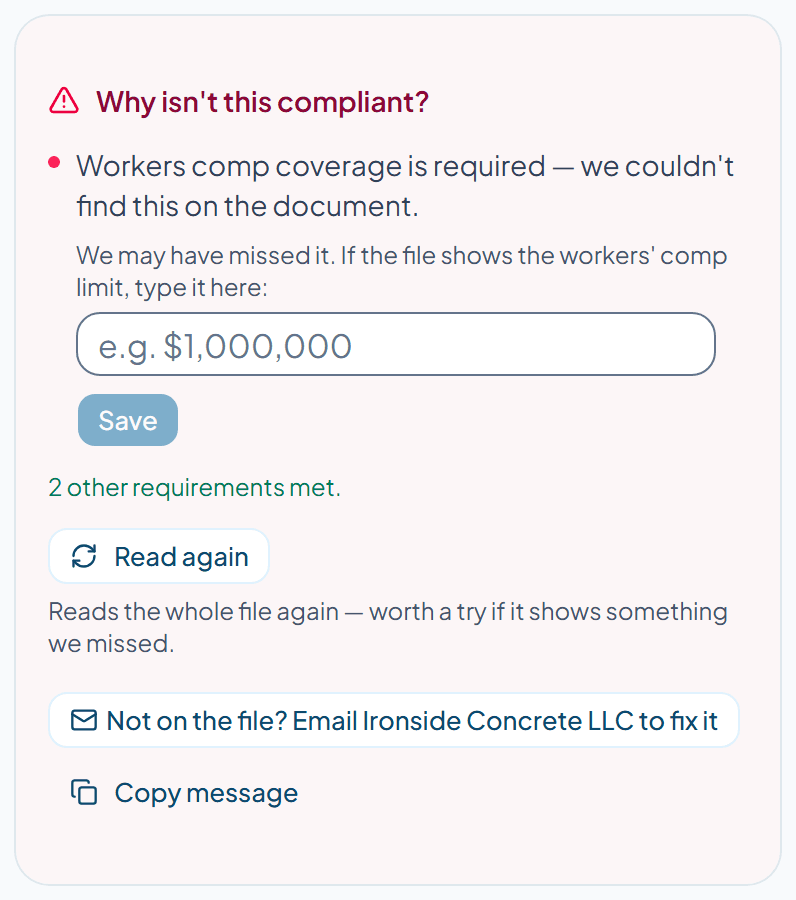
A certificate that fell short: workers' compensation is required and was not found on the document, with the ways to put it right. The vendors and documents shown are made up. 3Set the renewal reminders
Every account starts with four reminder points: 60, 30, 14 and 7 days before a document expires. You are emailed at all four; the sub is emailed at 30, 14 and 7. You can switch any point off, or switch off the email to the sub. The days themselves are fixed, and nothing is sent once a document has expired: it shows as Expired instead.
On the Free plan the sub's reminder asks them to send the renewal to you, and you upload it.
Paid plansOn a paid plan the sub's reminder carries a private upload link, and you can email that link to a sub at any time. They need no login, no password and no account: they see what you require and a note from you, then upload a PDF or a photo.
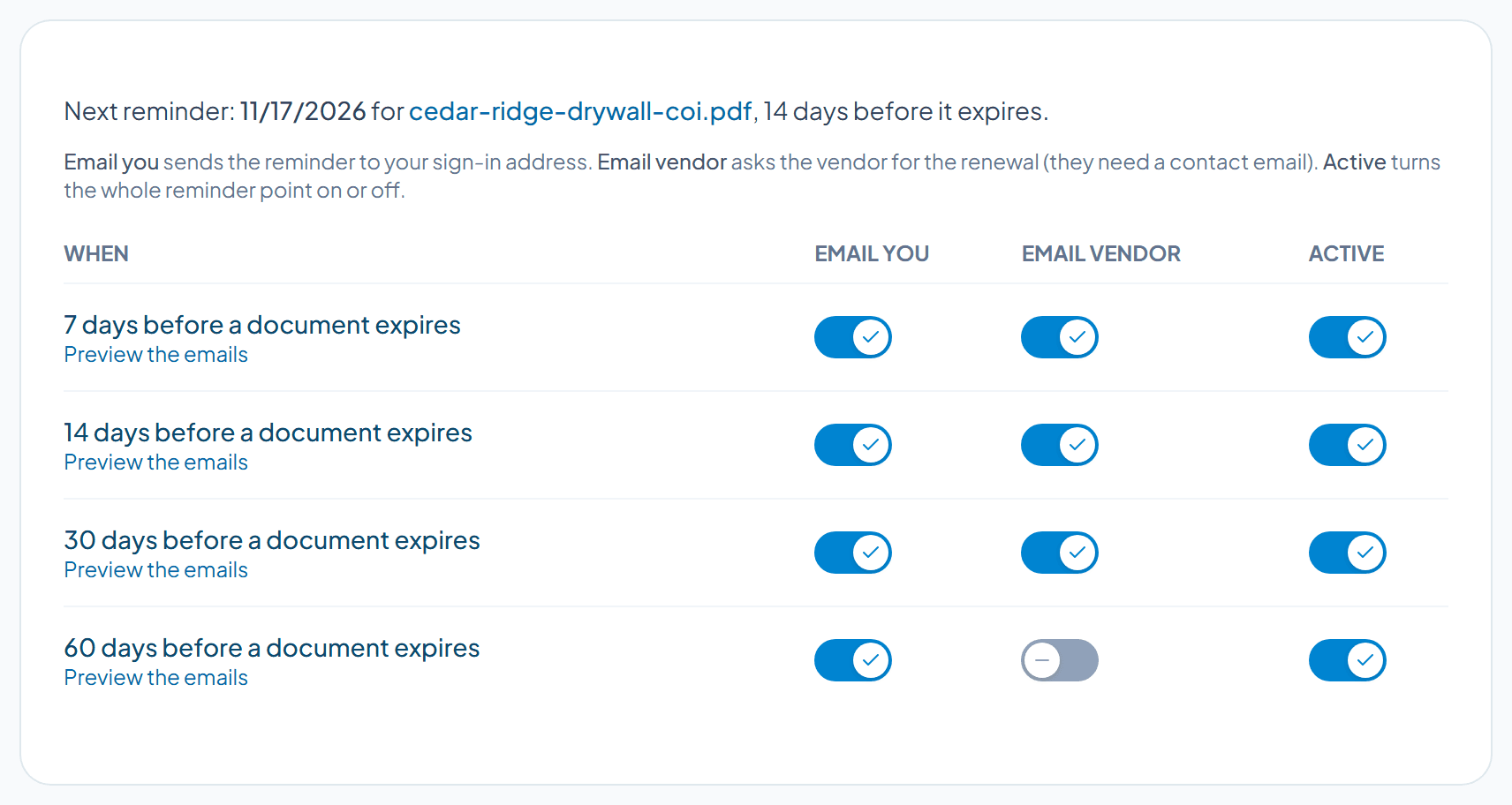
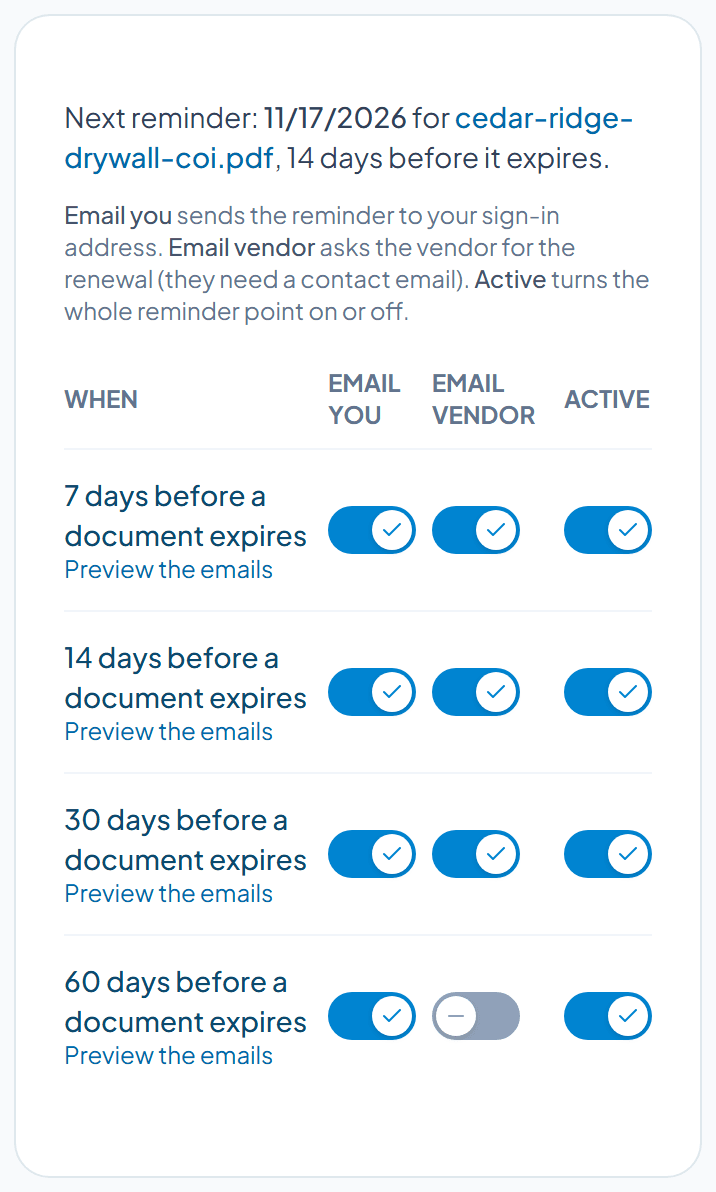
The Reminders page: the four reminder points, and who is emailed at each. The vendors and documents shown are made up.
What you get
- Certificates and licenses are read for you. Certificates of insurance (including ACORD 25), business and trade licenses, permits and certifications are read automatically.
- Checks against your own requirements. Insurance certificates, licenses and certifications are checked against your requirements. For permits, add checklist requirements for a permit number and expiration date. Contracts and documents filed as Other are tracked for their expiration dates and reminders.
- Checklists you can change. Pick a ready-made checklist or build your own: general liability, auto, professional and umbrella minimums, workers' comp on file, additional insured, license and certification numbers and expiry. General liability is compared with the certificate's each-occurrence limit.
- Additional insured. Add your business name as a required additional insured and CompliDrop looks for it on each certificate. Additional insured vs. certificate holder
- Reminders to you and to the sub. Reminders go out 60, 30, 14 and 7 days before a document expires. From 30 days out the vendor gets them too, on every plan.
- Records you can hand over. On every plan, export an audit-ready PDF report or a CSV of your documents and their status, or a PDF summary for one vendor.
- Paid plansUpload links for your subs. On a paid plan, each vendor gets a private upload link: no login, no password, no account. When a vendor uploads through their link, you get an email once it has been read, saying where it stands.
- Works in a phone browser. There is no app to install. You can upload a photo of a certificate from your phone.
Where a person still has to look
- When a read is uncertain, CompliDrop asks you to check the outlined values against the file. A Compliant status means the values that were read met your checklist; it does not mean a person reviewed the document.
- Waiver of subrogation, primary and non-contributory wording and aggregate limits are not read or checked. If your contracts require them, look for them on the certificate yourself.
- The workers' compensation check is that coverage is on the certificate. It does not compare a workers' compensation limit with a minimum.
- CompliDrop reads the certificate as it was uploaded. It does not contact the insurer, so it cannot know that a policy changed or ended after the certificate was issued. Verify current coverage with the issuing carrier when it matters.
What CompliDrop does not do
It is better to know these before you sign up than after.
- No requirements per project or job site. Each sub has one checklist, whichever jobs they work on.
- No payment holds, lien waivers or payroll.
- No W-9 verification and no e-signatures.
- No connection to construction-management or accounting software.
- No live check with the insurer and no legal determination of what a sub must carry.
- One login per account today.
Price, and the offer today
- Free: $0 a month
- Track up to 5 documents at a time: remove one and the slot is free again. Automatic reading, checks against your checklist, reminders to you and your vendors, and exports. No vendor upload links: those need a paid plan. Never charged, no card needed.
- Pro: $49 a month
- Everything in Free, plus unlimited documents and vendor upload links. Flat: no per-vendor fee. Monthly plans cancel anytime.
- Annual: $39 a month
- Billed $468/year. The same features as Pro, prepaid for the year.
Unlimited means no cap on documents. Automatic reading has a monthly fair-use limit; if you ever reach it, contact us to raise it.
You can start on the Free plan with up to 5 documents at a time, to try uploading and reviewing the records you already have. No credit card. Vendor upload links need a paid plan. Pro is $49 a month, flat, with no per-vendor fee.
Support
Support is by email only, at support@complidrop.com. We reply within two business days. Business days are Monday to Friday, Western European Time, which is usually five hours ahead of US Eastern Time. That is a promise to reply, not a promise that every problem is solved in two days. There is no phone support and there are no calls.
The FAQ and the contact page have more.
Questions
Can I require different coverage for different projects?
Not today. Each subcontractor has one checklist. You can build as many checklists as you need, for example one for electricians and one for roofers, but a sub cannot have a different checklist for each project.
Does it check waiver of subrogation or primary and non-contributory wording?
No. CompliDrop reads the policyholder, the insurer, the policy number, the effective and expiration dates, the general liability each-occurrence limit, the auto, umbrella and professional limits, workers' compensation, the certificate holder, the description of operations and the additional insured. It does not read or check waiver of subrogation, primary and non-contributory wording, or aggregate limits.
How does the additional insured check work?
Add your business name to your own checklist as a required additional insured, and CompliDrop looks for that name on each certificate. It reads the certificate only: it does not see the policy or its endorsements, so ask the sub's agent for the endorsement when your contract requires it.
Do my subs need an account?
No. On the Free plan you upload the certificates your subs send you. On a paid plan each sub gets a private upload link with no login, no password and no account. Anyone who has the link can upload through it, and you can revoke a link at any time.
Does it handle W-9s, lien waivers or payment holds?
No. CompliDrop tracks certificates of insurance, licenses, permits and certifications. A W-9 or a lien waiver can be kept as an “Other” document, which is stored but not checked, and there are no payment holds.
What does it cost?
Free is $0 a month: Track up to 5 documents at a time: remove one and the slot is free again. Automatic reading, checks against your checklist, reminders to you and your vendors, and exports. No vendor upload links: those need a paid plan. Never charged, no card needed. Pro is $49 a month: Everything in Free, plus unlimited documents and vendor upload links. Flat: no per-vendor fee. Monthly plans cancel anytime. Annual is $39 a month: Billed $468/year. The same features as Pro, prepaid for the year. Unlimited means no cap on documents. Automatic reading has a monthly fair-use limit; if you ever reach it, contact us to raise it.
What happens to my documents if a paid plan ends?
If a paid plan ends, your documents stay. Vendor upload links stop working, and new uploads need you to be back within the Free plan's limit of up to 5 documents at a time. You can change or cancel a plan, or update your card, yourself in Settings under Manage billing.
How do I get help?
Support is by email only, at support@complidrop.com. We reply within two business days. Business days are Monday to Friday, Western European Time, which is usually five hours ahead of US Eastern Time. That is a promise to reply, not a promise that every problem is solved in two days. There is no phone support and there are no calls.
Start with the certificates you already have on file.
You can start on the Free plan with up to 5 documents at a time, to try uploading and reviewing the records you already have. No credit card.
Vendor upload links need a paid plan. Pro is $49 a month, flat, with no per-vendor fee.